
在弄电子发票识别的时候,提示No module named 'pdfplumber',也就是没有安装pyautogui模块,但在安装的时候又出现如下报错:error:subprocess-exited-with-errorpipsubprocesstoinstallbuilddependenciesdidnotrunsuccessfully.exitcode
扫码分享

详细介绍
在弄电子发票识别的时候,提示No module named 'pdfplumber',也就是没有安装pyautogui模块,但在安装的时候又出现如下报错:
error: subprocess-exited-with-error

pip subprocess to install build dependencies did not run successfully.
exit code: 1

[3 lines of output]
Looking in links: c:\Users\INSUNNY\AppData\Local\Shadowbot\cache\packages
ERROR: Could not find a version that satisfies the requirement setuptools>=40.8.0 (from versions: none)
ERROR: No matching distribution found for setuptools>=40.8.0
[end of output]

note: This error originates from a subprocess, and is likely not a problem with pip.
error: subprocess-exited-with-error

pip subprocess to install build dependencies did not run successfully.
exit code: 1

See above for output.

note: This error originates from a subprocess, and is likely not a problem with pip.
经过摸索找到解决办法最后成功正常安装,步骤如下:
1、进入影刀RPA应用对应的本地PY环境目录:
C:\Users\13664\AppData\Local\ShadowBot\users\8c647532-17dd-4623-acb7-a2f0d8afef5f\apps\f8c1cf50-6f4a-49d9-ae65-d46b0398fd5a\venv\Scripts
其中f8c1cf50-6f4a-49d9-ae65-d46b0398fd5a是指当前RPA应用的ID;
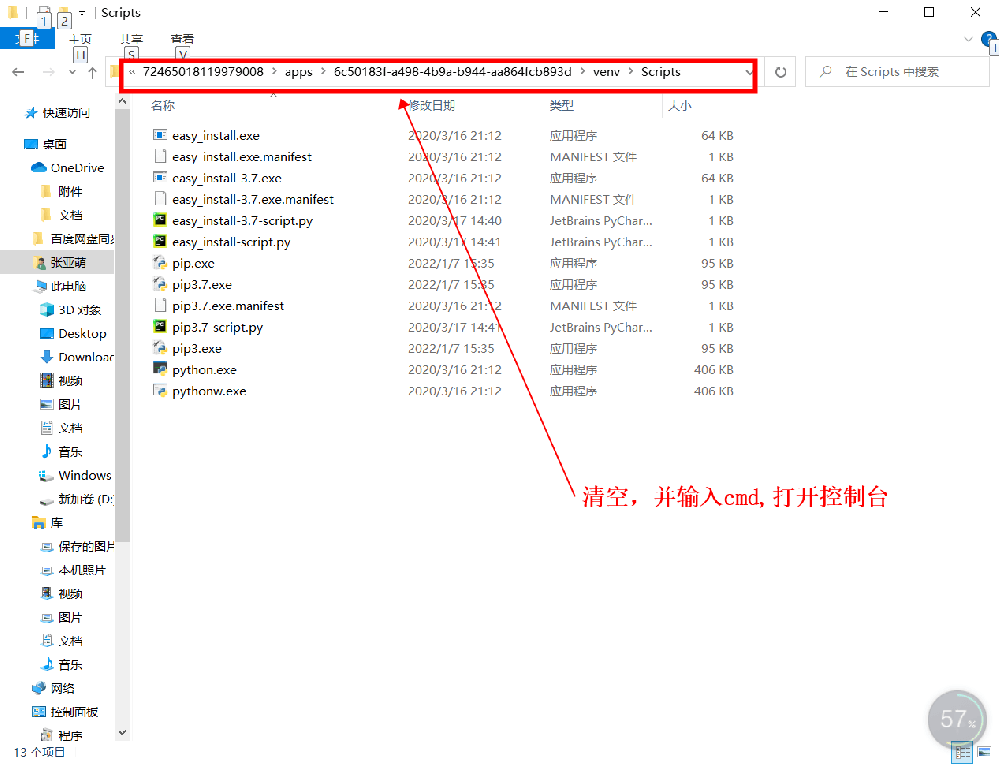
2、打开上述目录后,在文件夹地址栏目里面输入"cmd",然后打开命令提示符;
3、在命令提示符里面分别输入以下命令:
python -m pip install --upgrade pip
与
python -m pip install pyautogui -i https://pypi.douban.com/simple
4、待以上两个安装成功后,再返回影刀客户端安装包即可
内容版权声明
内容链接:https://www.diezanrpa.com/jinengjiqiao/381.html
内容标题:在影刀RPA应用客户端中使用【电子发票识别】指令添加pyautogui模块安装失败
当前文章由【谍赞AI助手】自主写作文案,内容版权归当前平台所有,用户可自由转载!
本文最后更新发布于【2023-09-11】,某些文章具有时效性,若有错误或已失效,请联系客服
争议处理:针对本文内容若有异义,亦可直接与【法律顾问:易兴俊,律师联系电话:13825799821】直接联系沟通